
The Library Is Learning to Act: Agentic AI in Libraries

From information access to intelligent task execution — what every library professional needs to know.

I still remember the days when I would walk into a library with a question in mind, move from catalogue to shelf, and slowly piece together meaning on my own, the system gave me access, but the responsibility to interpret always stayed with me. No wonder, we built our entire professional identity around this model.

But somewhere along the way, quietly and steadily, this arrangement has begun to change.

Today, we are not just talking about better search or faster discovery. We are witnessing a shift from information access to intelligent task execution. What we once navigated ourselves, machines are now beginning to navigate on our behalf.

Let me explain this journey as I have come to understand it.

In the early phase, our systems, OPACs, databases, catalogues, they were efficient, but limited. They responded to queries, but they never understood intent. That gap between what the user meant and what the system retrieved, that was our space as librarians. That was our value.

Then came the first wave of AI. Chatbots, recommendation tools, smarter interfaces. They made things easier. They reduced effort. But they still depended on the user to drive the process. They could assist, but not act.

Now, we are entering a new phase. Agentic AI.

This is where things become interesting. And slightly unsettling.

These systems do not stop at answering questions. They take a goal, break it into steps, use multiple tools, check results, and refine their own process. In simple terms, they do the work. The model has shifted from asking and receiving to planning and executing.

By the way, this does not mean humans are out of the picture. It means the role of navigation is shifting, from the user to the system, but always under human supervision.

When I first explored how these systems actually function, I realised they are not magic. They are structured, layered systems.

First, they ingest data. PDFs, scanned texts, MARC records, web content. They clean it, structure it, and make it searchable.

Second, they think, or at least simulate thinking. They take a goal and create a plan. They break tasks into steps and track progress.

Third, they connect. To Koha, DSpace, CrossRef, ORCID, and many more systems. Their power grows with every connection.

And finally, they act. Not by giving you text alone, but by producing usable outputs, catalogue records, bibliographies, reports, corrections. Outputs that enter real workflows.

Just imagine what this means for our daily work.

Cataloguing, which once demanded hours of manual effort, is now being partially handled by AI systems that extract metadata, suggest classifications, and prepare draft records. Still, human review remains essential. Accuracy without oversight is a risk we cannot afford.

Subject classification is evolving too. Tools like Annif learn from existing catalogues and apply that knowledge to new materials. But their effectiveness depends heavily on the data we provide, especially for regional and multilingual collections.

Reference services are also changing. A single query can now trigger a chain of actions, retrieving records, analysing sources, and generating structured reading lists. Yet, when it comes to deep research guidance or sensitive queries, the human touch remains irreplaceable.

Collection development has become more data-driven. AI can identify gaps, track demand, and suggest acquisitions with measurable impact. This was difficult to achieve at scale earlier.

And then there is workflow automation, the silent transformation. Deduplication, metadata enrichment, batch processing. These are not glamorous tasks, but automating them saves significant time. In some institutions, up to 50 percent efficiency gains have been reported.

Of course, with every opportunity comes risk.

I have seen how AI can confidently produce incorrect information. Fabricated references, wrong classifications. Without proper checks, this can damage trust.

Bias is another concern. Systems learn from past data, and past data carries historical bias. If we are not careful, we risk reinforcing outdated or unbalanced perspectives.

Privacy also demands attention. User queries, reading habits, borrowing patterns, these are sensitive. Libraries have always protected this data. We must continue to do so, even in AI-driven environments.

And then there is vendor lock-in. If we lose control over our systems and data, we compromise our independence. Open standards and flexible systems are not optional, they are necessary.

All this brings me to what I feel is the most important part, the human side.

AI will not replace librarians. But it will change what we do.

Routine, repetitive tasks will reduce. But roles will evolve.

Cataloguers will supervise AI outputs. Reference librarians will engage in deeper research support. Collection specialists will rely more on data and analytics.

This means we must learn new skills. Prompting, evaluating AI outputs, understanding data, working with APIs. Alongside this, we must also engage with policy, ethics, and privacy.

These are not technical add-ons. These are becoming core professional competencies.

If you ask me how to begin, I would say start small.

Pick one use case. Test it. Learn from it.

Then expand gradually. Introduce human oversight. Train your team.

Integrate systems carefully. Build connections through APIs.

And only then think about optimisation and scale.

This is not a race. It is a structured transition.

Looking ahead, I see a phased future.

In the next few years, assisted cataloguing and automated workflows will become common. Reference queries will increasingly be handled by AI systems.

A little later, we will see multiple AI agents working together across different library functions.

And in the long run, we may see deeply integrated systems with strong institutional memory, almost like AI co-librarians.

But let us be clear about one thing.

Fully autonomous libraries are not realistic. Nor are they desirable.

What will succeed is a balanced approach. AI systems that handle defined tasks. Humans who guide, supervise, and take responsibility.

In the end, I do not see this as a story of replacement. I see it as a story of augmentation.

The library has always stood for access, equity, and intellectual freedom. These values do not change. What changes is how we deliver on them.

And perhaps, for the first time, we are not just helping users navigate knowledge. We are building systems that can navigate it with us.

That is a powerful shift. And a responsible one.
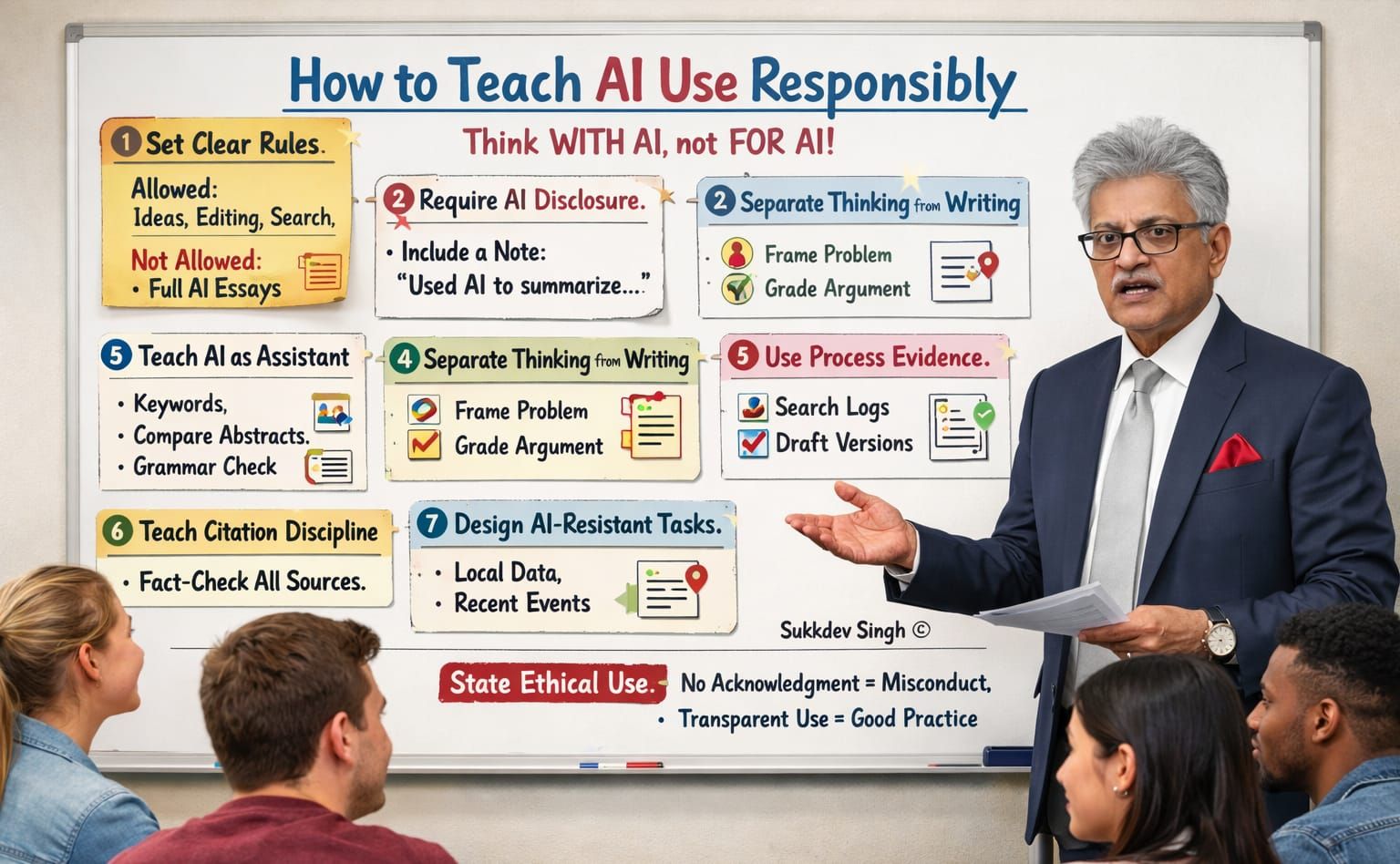
AI Use in Education: Teach Academic Integrity by Design, Not Detection.

(AI Generated Image)

I have watched academic integrity policies evolve for years, and I will say this plainly. In the age of AI, trying to catch students using tools is a losing battle. I have seen detection software fail, policies confuse students, and honest learners punished for unclear rules. What works is not surveillance. What works is clarity, design, and trust.

When AI entered classrooms, many institutions reacted with fear. Ban it. Block it. Police it. But students did not stop using AI. They simply stopped talking about it. That silence is where misconduct grows. I have learned, through practice and discussion with educators, that integrity survives when we shift the focus from hiding AI use to documenting and reflecting on it.

Everything starts with clarity.

The first responsibility lies with the syllabus. If AI rules are vague, students will interpret them in their favour. If they are invisible, students will ignore them. You need to make AI use explicit and visible. State clearly what is acceptable and what crosses the line. Idea generation, refining search terms, improving language, these are legitimate supports. Submitting AI-generated analysis as original thinking is not. Ambiguity is not neutral. It creates ethical grey zones where students stumble.

Next comes disclosure. I strongly believe AI use should be declared, not denied. A short note is enough. Something as simple as, “Used AI to summarise five abstracts and rewrote the final synthesis myself.” This mirrors what journals and funding agencies are beginning to demand. Transparency normalises ethical behaviour. It also removes the fear students feel when they use tools quietly and wonder if they will be accused later.

We must also teach students what AI is for. AI is a research assistant, not a writer. I always emphasise this distinction. Show students how to use AI to generate keywords from a research question. Show them how to compare abstracts across databases. Ask AI to surface counterarguments to a draft thesis. Use it to check clarity and grammar at the final stage. These uses strengthen thinking rather than replace it. When students see AI as support, not substitution, integrity follows naturally.

Assessment design matters even more. Thinking and writing must be separated. If language quality carries most of the marks, AI will dominate. Instead, grade problem framing, source selection, and argument structure independently from expression. AI still struggles with original reasoning and contextual judgement. By valuing these elements, you protect academic integrity without banning tools outright.

Process-based assessment is another quiet but powerful shift. Ask for search logs, prompt histories, draft versions, and short reflections. Ask students where AI helped and where it failed. This changes what you assess. You stop judging only the final output and start evaluating learning itself. From my experience, students become more reflective and more honest when they know their process matters.

Citation discipline must be taught early and repeatedly. AI can fabricate references, blend sources, and paraphrase without attribution. Students often trust it blindly. They should not. Train them to verify every citation using Google Scholar or Scopus. Make verification a habit, not a warning. Once students understand how easily errors slip in, they become more cautious and responsible.

Assignment design is the final safeguard. Generic prompts invite generic AI responses. Local data, recent events, personal reflection linked to theory, or comparison of two specific papers make shallow AI output obvious. These designs do not fight AI. They outgrow it.

And then, you must say this clearly and consistently. Using AI without acknowledgement is misconduct. Using AI transparently and critically is a scholarly practice. Students understand rules when we speak plainly and apply them consistently.

The goal is simple. Students should learn how to think with AI, not outsource thinking to it. If we design teaching and assessment with this goal in mind, integrity does not weaken. It matures.

How AI Tools Revolutionize Academic Research: Top 10 Free Tools to Boost Your Workflow

Artificial Intelligence (AI) is transforming academic research by streamlining repetitive tasks, uncovering insights, and enhancing productivity across every stage of the research process. From conducting literature reviews to analyzing data and polishing manuscripts, AI tools save time and improve efficiency. In this blog post, we explore how AI tools can elevate your research and highlight 10 free AI tools (with free plans) that support various research stages, complete with descriptions and links to get you started.


How AI Tools Enhance Academic Research

AI tools empower researchers by automating and optimizing key research tasks. Here’s how they help at different stages:

  • Literature Review: AI tools search vast academic databases, summarize papers, and identify connections between studies, making it easier to stay updated and find relevant sources.
  • Data Collection: Extract data from PDFs, texts, or online sources quickly, reducing manual effort.
  • Data Analysis: Analyze large datasets, identify patterns, and create visualizations with minimal coding.
  • Academic Writing: Improve clarity, grammar, and academic tone while generating outlines or paraphrasing content.
  • Citation Management: Automate citation formatting and reference organization across styles like APA or MLA.
  • Collaboration: Organize research materials, visualize citation networks, and share findings with teams.
  • Translation: Break language barriers by translating papers in real-time for global accessibility.

Now, let’s dive into the top 10 AI tools with free plans that can supercharge your academic research.


Top 10 Free AI Tools for Academic Research

1. Semantic Scholar

  • What It Does: A powerful AI-driven search engine for accessing over 200 million academic papers. It generates concise summaries, recommends related studies, and highlights connections between papers, perfect for literature reviews.
  • Free Plan: Completely free with unlimited searches and access to open-access papers (paywalled papers depend on your subscriptions).
  • Best For: Finding and summarizing relevant research quickly.
  • Website: semanticscholar.org

2. Elicit

  • What It Does: An AI research assistant that searches over 125 million papers, automates literature reviews, summarizes findings, and extracts data. It’s ideal for empirical research but less suited for theoretical studies.
  • Free Plan: Free access to search, summarization, and data extraction with no strict limits (verify results due to ~90% accuracy).
  • Best For: Streamlining literature reviews and data extraction.
  • Website: elicit.com

3. Research Rabbit

  • What It Does: A free tool that creates visual citation networks, suggests related papers, and organizes research collections. It’s great for exploring research connections and collaborating with peers.
  • Free Plan: Fully free with unlimited collections and paper additions (note: the interface may take some getting used to).
  • Best For: Organizing research and discovering related studies.
  • Website: researchrabbit.ai

4. Zotero

  • What It Does: A reference management tool that uses AI to suggest papers, organize citations, and generate bibliographies in various formats. It integrates seamlessly with word processors.
  • Free Plan: Free with unlimited reference storage; cloud syncing limited to 300 MB (expandable with paid plans).
  • Best For: Managing citations and references effortlessly.
  • Website: zotero.org

5. Scholarcy

  • What It Does: Summarizes research papers, articles, and book chapters into flashcards, highlighting key findings, limitations, and comparisons. It cuts screening time by up to 70%.
  • Free Plan: Summarize up to three documents per day; includes a browser extension for open-access and subscription-based papers.
  • Best For: Quickly digesting complex papers.
  • Website: scholarcy.com

6. ChatPDF

  • What It Does: Upload PDFs and interact with them via a chatbot to extract information or summarize content. It’s a time-saver for understanding dense research papers.
  • Free Plan: Upload two PDFs per day (up to 120 pages each) and ask 20 questions daily.
  • Best For: Extracting specific data from PDFs.
  • Website: chatpdf.com

7. Paperpal

  • What It Does: An AI writing assistant tailored for academia, offering grammar checks, paraphrasing, citation generation, and journal submission checks. It also supports literature searches and PDF analysis.
  • Free Plan: Basic grammar and style suggestions, 10 AI generations daily, and limited research features.
  • Best For: Polishing academic writing and translation.
  • Website: paperpal.com

8. NotebookLM

  • What It Does: A Google-powered tool that lets you upload up to 50 documents per notebook and generates summaries, audio overviews, or study guides. It’s perfect for organizing research materials.
  • Free Plan: Free with up to 100 notebooks, 50 sources per notebook, and daily limits on queries and audio summaries.
  • Best For: Summarizing and organizing research notes.
  • Website: notebooklm.google

9. AI2 Paperfinder

  • What It Does: Developed by the Allen Institute, this tool provides access to 8 million full-text papers and 108 million abstracts. It ranks search results by relevancy and exports citations in BibTeX or other formats.
  • Free Plan: Fully free with no limits on searches or citation exports.
  • Best For: Comprehensive literature searches and citation exports.
  • Website: paperfinder.allenai.org

10. DeepSeek

  • What It Does: A free large language model that answers research queries and synthesizes information. While not as advanced as premium models, it’s a solid option for general research assistance.
  • Free Plan: Fully free with no specific query limits (performance may vary for complex tasks).
  • Best For: General research queries on a budget.
  • Website: deepseek.com

Tips for Using AI Tools in Research

  • Verify Outputs: Tools like Elicit and ChatPDF may have errors (~90% accuracy for Elicit). Always cross-check results with original sources.
  • Combine Tools: Free plans have limitations (e.g., Scholarcy’s three-document cap). Use multiple tools to cover all research needs.
  • Maintain Integrity: AI should enhance, not replace, your critical thinking. Use these tools to boost productivity while ensuring originality.
  • Explore Paid Plans: If you hit free plan limits, consider paid upgrades for heavy use or advanced features.

Conclusion

AI tools are game-changers for academic research, helping you save time, uncover insights, and produce high-quality work. The 10 free tools listed above cover everything from literature reviews to citation management, making them accessible for students, researchers, and academics on a budget. Start exploring these tools today to streamline your research process and focus on what matters most—advancing knowledge.

Have a favorite AI research tool or need help with a specific research task? Share your thoughts in the comments below!

Chat with PDF files: AI Tools to Ask Questions to PDFs for Summaries and Insights

In today’s digital world, we are inundated with information, much of it locked away in PDF documents. Whether you are a student combing through research papers, a professional analysing detailed reports, or someone simply trying to extract crucial information from a large PDF, you’ve likely felt overwhelmed. But what if I told you that you could actually chat with those PDFs? Thanks to recent advancements in AI, this once far-fetched idea is now a reality.

The Power of AI in Document Analysis

AI-powered tools are transforming how we engage with PDFs, allowing us to swiftly access information, summarise content, and even query documents directly. These tools combine several cutting-edge technologies:

  1. Text Extraction: Utilising Optical Character Recognition (OCR) for scanned documents and PDF parsing libraries for digital PDFs.
  2. Natural Language Processing (NLP): AI analyses the extracted text to grasp content, structure, and context.
  3. Entity Recognition: Identifies specific entities such as names, dates, and organisations.
  4. Chat Integration: AI generates responses based on user queries and the document’s content. Top AI Tools for PDF Interaction

Let’s explore some of the leading tools in this field:

  1. ChatPDF

ChatPDF allows you to upload any PDF and ask questions about its content. Ideal for textbooks, research papers, or business documents, it quickly generates answers based on the data within the PDF. It’s also available as a plugin within ChatGPT, making it even more accessible.

  1. PDF.ai

PDF.ai specialises in multi-language PDF interaction, making it perfect for users working across different languages. It enables dynamic conversations with documents, breaking down language barriers in document analysis.

  1. GPT-PDF by Humata

Built on GPT technology, this tool offers deep interaction with complex files like reports or whitepapers. It’s particularly useful for users needing to analyse and generate insights from technical documents.

  1. Ask Your PDF

Ask Your PDF stands out with its powerful semantic search capability, excelling at analysing multiple documents simultaneously. This makes it an excellent choice for comprehensive research projects that require synthesising information from various sources.

  1. Adobe Acrobat AI Assistant

Integrated into the widely used Adobe Acrobat, this AI assistant enhances document interaction while retaining Acrobat’s traditional editing capabilities. It’s a great option for users already familiar with the Adobe ecosystem.

  1. PDFgear (Open-Source Option)

For those who prefer open-source solutions, PDFgear offers notable advantages:

  • Its open-source framework ensures transparency and customisation.
  • It supports interactions with multiple PDF files in a single session.
  • It is compatible with various AI backends like OpenAI and Anthropic.
  • Local deployment options provide greater privacy and security.
  • Available through both a web interface and command-line option. The Future of Document Interaction

These AI-powered PDF tools are just the beginning. As natural language processing and machine learning technologies continue to evolve, we can expect even more advanced document interaction capabilities. Imagine AI assistants that not only answer questions but also provide personalised insights, generate summaries tailored to your needs, or even create new documents based on the information contained within your PDFs.

Conclusion

The days of tediously scrolling through lengthy PDFs or relying solely on basic search functions are behind us. With these AI tools, we are entering an era where documents become interactive, responsive resources. Whether you’re a student, researcher, professional, or anyone who frequently works with PDFs, these tools can significantly streamline your workflow, making it easier than ever to extract and analyse information.

Have you tried any of these PDF tools? What’s been your experience? The world of AI-assisted document analysis is rapidly evolving, and it’s an exciting time to explore these new capabilities. As AI continues to push the boundaries of document interaction, the future promises even more innovative and powerful tools.

AI Tools in Education: Empowering Learning and Creativity

In recent years, artificial intelligence (AI) has made significant strides in various fields, and education is no exception. The integration of AI tools in education is revolutionising how we learn, teach, and collaborate. This blog post explores the exciting world of AI in education, focusing on different types of AI tools and their applications, as well as discussing the responsible use of this powerful technology.

Understanding Generative AI

Generative AI is a branch of artificial intelligence that focuses on creating new content such as text, images, audio, and video by learning from existing data. Unlike traditional AI, which primarily analyses and predicts outcomes based on input data, generative AI models can produce original outputs that mimic the characteristics of their training data.

This capability has led to significant interest and investment across various sectors, with tools like ChatGPT, DALL-E, and Midjourney demonstrating practical uses in text, image, audio, and video generation.

 AI Tools for Various Educational Purposes

 1. Chatbots and Text Generation

Several AI-powered chatbots and text-generation tools are available to assist students and educators:

  • ChatGPT: A versatile conversational AI for writing, coding, and tutoring.
  • Claude: Designed for various tasks with a focus on safety and ethical AI behaviour.
  • Google’s Gemini: A multimodal AI capable of understanding and generating text, images, videos, and audio.
  • Microsoft Copilot: Integrates into the Microsoft ecosystem for context-aware assistance.
  • Perplexity: An AI-powered search and answer engine.
  • Pi: An AI assistant designed for open-ended conversations and emotional support.
  • Grok: Unique AI with real-time access to X (formerly Twitter) for current events analysis.

For more specific text generation tasks, tools like HyperWrite, Smart Copy AI, Simplified AI Writer, Quillbot, and Copy.AI offer various features to improve writing efficiency and quality.

 2. Research Assistance

AI tools can significantly enhance the research process:

  • Consensus AI: Scans millions of scientific papers to find relevant ones based on your query.
  • Connected Papers and Litmaps: Visualize research areas and discover related papers.
  • Research Rabbit: Assists with literature mapping and paper recommendations.
  • Scite: Analyses and compares citations across research papers.
  • Open Knowledge Maps: Emphasizes open access content and provides research topic overviews.
  • Paper Digest: Helps in writing literature reviews by extracting essential information from papers.
  • PDFgear: Offers AI-powered PDF manipulation and information extraction.
  • Paperpal and Jenni: Provide specialized AI-powered writing assistance for academic and scientific writing.

 3. Writing Improvement

  • Grammarly: A free AI writing assistant that provides personalized suggestions to enhance your text across various platforms.
  • Trinka: Designed specifically for academic and technical writing, focusing on clarity and precision.

 4. Learning and Teaching

  • Summarize.tech: Uses AI to summarize lengthy YouTube videos, condensing hours of content into key points.
  • Quizlet: An AI-powered learning platform offering interactive flashcards, practice tests, and study activities.
  • Curipod: Helps teachers create engaging lessons with interactive activities.
  • ClassPoint: An all-in-one teaching and student engagement tool that works within PowerPoint.
  • Yippity: Converts information into various types of questions for learning and assessment.
  • Coursebox: An AI-powered platform for creating and managing online courses.
  • Goodgrade AI: Assists in writing essays, summarizing documents, and generating citations.

 5. Collaboration Tools

  • Otter.ai: Transcribes speech in real-time and offers collaboration features for document sharing and management.
  • Notion: A versatile digital workspace with AI capabilities for organizing research materials, managing projects, and facilitating collaboration.

 Responsible Use of AI in Education

While AI tools offer tremendous benefits, it is crucial to use them responsibly. Here are some key considerations:

1. Avoid Plagiarism: Always review AI-generated content carefully, rephrase ideas in your own words, and cite AI-generated content when necessary.

2. Maintain Academic Integrity: Use AI as a brainstorming tool, not a shortcut for entire projects. Be transparent about AI usage in your work.

3. Protect Privacy: Read terms of service, avoid sharing sensitive information, and use AI tools that prioritize user privacy.

4. Apply Human Oversight: AI is not always accurate and may lack context or nuance. Verify its output, especially in critical fields like law, medicine, or academia.

5. Set Boundaries: Find a balance where AI enhances your creativity but does not replace your effort. The goal is to learn and develop your own skills.

6. Follow Institutional Guidelines: Adhere to your institution’s policies on AI use to maintain integrity and trust.

 Conclusion

Generative AI is transforming education by offering powerful tools for learning, research, writing, and collaboration. By using these tools responsibly and ethically, students and educators can unlock new levels of creativity and efficiency in their academic pursuits. As AI continues to evolve, it is exciting to imagine the future possibilities in education and beyond.

Remember, while AI can be an invaluable assistant, it is your unique human perspective, critical thinking, and creativity that will truly set your work apart. Embrace AI as a tool to enhance your abilities, not replace them, and you will be well-equipped to thrive in the AI-augmented future of education.

AI Tools for Scholarly Articles: Enhancing Research Efficiency

Introduction

Research is a vital but challenging part of academic work. It involves finding, reading, analysing, and synthesising large amounts of information from various sources. It also requires writing, editing, and proofreading papers that are clear, coherent, and convincing. These tasks can be time-consuming and tedious, leaving little room for creativity and innovation. Fortunately, artificial intelligence (AI) can help researchers overcome these challenges and enhance their research efficiency and quality. AI-powered tools can assist researchers with various aspects of their work, such as literature review, writing, editing, citation management, and more. However, there are some limitations and drawbacks of using such tools for academic articles. In this article, we will explore some of the best AI tools for scholarly articles and how they can benefit researchers.

AI Tools for Scholarly Articles

AI tools can help researchers with different stages of their research process, from finding relevant papers to writing and publishing them. Some benefits of using AI tools are:

– They can save time and effort by automating tedious and repetitive tasks, such as searching for papers, summarising them, extracting key information, and generating citations.

– They can improve the quality and accuracy of research by providing data-driven insights, feedback, and suggestions, as well as detecting and correcting errors in grammar, spelling, and style.

– They can enhance the creativity and originality of research by generating new ideas, content, and headlines, as well as finding hidden connections and patterns among research topics.

Examples of Popular AI Tools for Scholarly Articles

There are many AI tools available for scholarly articles, each with its own features and functions. Here are some examples of popular AI tools that researchers can use:

Semantic Scholar:

Academic search engine that helps researchers find relevant and trustworthy papers for their research topic. It also provides single-sentence summaries, similar paper recommendations, and citation evaluation for each paper.

Bit.ai:

Research organization tool that helps researchers store, manage, and collaborate on their online research sources. It supports various formats of content, such as blogs, articles, videos, infographics, and images.

Scholarcy:

Research summarization tool that helps researchers extract key points, figures, and references from academic articles. It also generates flashcards and outlines for each article to help researchers review and remember the main takeaways.

Scite:

Citation evaluation tool that helps researchers check the reliability and impact of citations in academic papers. It also provides smart citations that show how a paper has been supported or contradicted by other papers.

Trinka:

Research paper writing tool that helps researchers improve their grammar, style, and clarity in academic writing. It also provides feedback on the overall structure and flow of a paper.

CopyAI:

Helps researchers generate creative and engaging content for their academic papers, such as introductions, conclusions, headlines, and bullet points. It uses natural language generation to produce high-quality text based on the researcher’s input.

Rytr:

Helps researchers write faster and better by providing suggestions, templates, and feedback for their academic writing. It also allows researchers to choose from different writing styles and tones to suit their audience and purpose.

Elicit:

Helps researchers automate research workflows, such as finding relevant papers, summarizing takeaways, and extracting key information from academic articles. It uses language models to answer questions with research evidence.

HyperWrite:

Helps researchers improve their academic writing style by providing suggestions for word choice, sentence structure, and tone. It also analyses the readability and complexity of a paper.

Moonbeam:

AI writing assistant that helps users compose essays, stories, articles, blogs, and other long-form content.

Grammarly:

Popular tool for proofreading and editing academic papers. It detects and corrects errors in grammar, spelling, and punctuation, as well as provides suggestions for improving vocabulary, clarity, and tone.

Mendeley:

Helps researchers manage their citations and references for their academic papers. It integrates with PDF readers and Microsoft Word to detect citations and quickly generate a bibliography.

Zotero:

A free, easy-to-use tool to help researchers collect, organize, annotate, cite, and share research. It streamlines the citation process and supports various formats and styles.

IBM Watson Discovery:

Helps researchers analyse and extract the necessary information from scientific papers and provide an overview of the information, summarizing it in an understandable format.

ProWritingAid:

Helps researchers improve their writing skills by detecting and correcting spelling, grammar, and stylistic errors, as well as providing feedback on the readability and structure of a paper.

Paper Digest:

A tool that helps researchers summarize academic articles in a few sentences, highlighting the main points and contributions of each paper.

Consensus:

A search engine for providing Evidence-Based Answers.

Benefits of AI Tools for Scholarly Articles

When it comes to writing a scholarly article, time is of the essence. Research, analysis, and drafting can take weeks or even months. Combine that with the pressure of deadlines, and you have a recipe for stress. AI tools can help alleviate some of the load by simplifying the process and increasing productivity. One benefit of AI tools is time-saving. They can automate several tasks, such as citation management and proofreading, reducing the workload for researchers and helping them focus on creating high-quality content. Efficiency enhancement is another advantage, as AI-based writing assistance tools can suggest vocabulary and phrasing that improve the clarity and coherence of the content. Moreover, AI tools can aid in producing higher-quality research. For instance, automated literature reviews can analyse hundreds of articles and find relevant data more quickly and accurately than manual searches. All in all, AI tools can significantly reduce the time and effort researchers put into scholarly articles while improving quality. They can be a valuable addition to any writer’s toolbox.

Potential Drawbacks and Limitations of AI Tools

When it comes to AI tools for scholarly articles, there are some potential drawbacks and limitations to keep in mind. For starters, AI tools may lack accuracy or specificity in their results. While they can certainly save time and energy in the research process, they may not always be able to provide the nuance or context that humans can. Another limitation of AI tools is their ability to understand humour and sarcasm. This is a key skill in many scholarly articles, especially those in fields like literature or cultural studies. While an AI tool may be able to grasp the basics of the language, it may not truly understand the nuances of irony, satire, or other forms of humour. Over-dependence on technology is also a potential drawback of AI tools for scholarly articles. Researchers who rely too heavily on AI may miss out on the benefits of human interpretation, analysis, and critical thinking. It’s important to remember that AI tools are meant to assist researchers, not replace them entirely. Finally, another potential drawback of AI tools is their lack of interpretation and analysis. While they can certainly automate certain aspects of the research process, they may not always be able to provide the level of insight and analysis that human researchers can. Overall, while AI tools can be incredibly helpful in enhancing research efficiency, it’s important to keep these potential drawbacks and limitations in mind. By using these tools with care and consideration, researchers can help ensure that they get the most out of AI technology without sacrificing the nuance, context, and critical thinking that is so crucial to scholarly articles.

AI tools can be used to help with a variety of tasks, including research, writing, and editing. They can be valuable resources for scholars, but it is important to use them with caution and to always use your critical thinking skills. AI is yet to be mature enough to be reliable.

Factors to Consider While Choosing AI Tools for Scholarly Articles

The process of choosing the right AI tool for your research can be overwhelming. To make an informed decision, several factors need to be considered. First, the tool’s ease of use must be taken into account. No researcher wants to spend valuable time learning how to operate a new tool, which may not improve research efficiency. Therefore, an AI tool that comes with a user-friendly interface and is easy to use is key. Secondly, the tool’s integration with existing tools should be considered. Researchers prefer to use tools that work well alongside others they are already using, without any compatibility issues. Thus, it’s essential to choose an AI tool that integrates well with other tools in your research process. Customer support is another factor to consider when selecting an AI tool. Researchers require technical help and assistance, and a provider that offers quality customer support is ideal. Customization options are equally important to ensure that the tool is compatible with your specific research needs. Lastly, the accuracy and reliability of the AI tool are non-negotiable. It’s crucial that the tool’s output is precise, relevant, and produces consistent results. In conclusion, when choosing an AI tool for scholarly articles, considerations should be made in terms of ease of use, integration with existing tools, customer support, customization options, and accuracy and reliability. Failure to consider one or more of these factors may lead to tools that compromise research quality, efficiency, and, most importantly, time. Last but not least point to consider is that most of these tools would be required to be purchased for full functionality.

Conclusion

In summary, AI tools have greatly enhanced the research efficiency of scholars by providing automated literature reviews, keyword extraction and summarization tools, citation management tools, AI-based writing assistance and automated proofreading and editing tools. The benefits include time-saving, efficiency enhancement and higher-quality research. However, potential drawbacks such as lack of accuracy or specificity in results, limitations in understanding humour and sarcasm, over-dependence on technology and lack of interpretation and analysis need to be considered.

References

10 AI Tools to Make Academic Writing Smarter & Faster. (2022, December 12). Retrieved May 23, 2023, from SmartScale: https://smartscalemarketing.com/blog/academic-writing-ai-tools/

Bello, C. E. (2023, May 8). Euronews. Retrieved May 23, 2023, from The best AI tools to power your academic research: https://www.euronews.com/next/2023/05/08/best-ai-tools-academic-research-chatgpt-consensus-chatpdf-elicit-research-rabbit-scite

Eager, B. (2023, April 10). Academic Writing with AI Tools. Retrieved May 23, 2023, from Bron Eager: https://broneager.com/academic-writing-with-ai-tools

Elicit. (n.d.). Retrieved May 23, 2023, from The AI Research Assistant: https://elicit.org/

Golan, R., Reddy, R., Muthigi, A., & Ramasamy, R. (2023, February 24). Artificial intelligence in academic writing: a paradigm-shifting technological advance. Nature Reviews Urology. Retrieved May 23, 2023, from https://doi.org/10.1038/s41585-023-00746-x

Musa, Z. (2021, October 26). PublishingState.com. Retrieved May 23, 2023, from Can AI Write Academic Papers? 5 Key Things to Assess: https://publishingstate.com/can-ai-write-academic-papers-5-key-things/2021/

Portakal, E. (2023, May 16). Retrieved May 23, 2023, from Best AI tools for academic writing: https://textcortex.com/post/best-ai-tools-for-academic-writing

Tay, A. (2021, August 17). AI writing tools promise faster manuscripts for researchers. Retrieved May 23, 2023, from Nature Index: https://www.nature.com/nature-index/news-blog/artificial-intelligence-writing-tools-promise-faster-manuscripts-for-researchers

The 5 Best AI Tools for Postgraduate Research. (n.d.). Retrieved May 23, 2023, from Scholarcy: https://www.scholarcy.com/the-5-best-ai-tools-for-postgraduate-research/

Trinka. (2023, March 16). The Five Best AI Tools Every Scholar Should Be Using. Retrieved May 23, 2023, from Trinka: https://www.trinka.ai/blog/the-five-best-ai-tools-every-scholar-should-be-using/